☁️
雲端背景轉錄+佇列Background cloud queue
一次選取多則純錄音筆記送出;處理名額、等待中與上傳進度看得見。音檔上傳完成即可關 App,稍後自動取回。Select multiple audio notes at once, see active slots and queued uploads, then close the app after upload and retrieve results later.
會議、上課、訪談——一鍵開錄,自動生成逐字稿、摘要、關鍵字與待辦。七種轉錄與翻譯方式,可選完全本機、即時直送或加密背景處理。 Meetings, lectures, interviews — tap once to record and get transcripts, summaries, keywords and to‑dos. Choose from seven modes: fully on-device, direct live streaming, or encrypted background processing.

從一鍵錄音到 AI 重點整理,影片帶你快速上手。From one tap to AI summaries — a quick walkthrough.
打開就錄,操作極簡;會議、上課、訪談分資料夾收好。Open and record. Keep meetings, lectures and interviews in folders.
雲端即時、立即/背景批次、即時翻譯、裝置端即時/整檔,或純錄音。Cloud live, immediate or background batch, live translation, on-device live or batch — or audio-only.
自動整理重點摘要、關鍵字與待辦,結論一眼掌握。Auto key points, keywords and to‑dos at a glance.
金鑰存裝置 Keychain,支援 iCloud 同步、可完全離線。Keys in the Keychain, iCloud sync optional, fully offline‑capable.
以下畫面由 iOS 模擬器實際執行專案截圖,呈現目前版本的錄音首頁、模式選擇、錄音中與設定體驗。These screenshots come from the current project running in the iOS Simulator: home, mode selection, recording and settings.
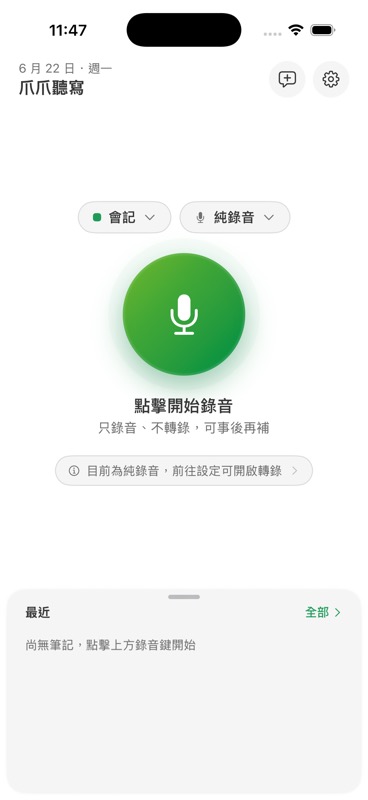
一開 app 就看到大錄音鍵;資料夾與模式切換留在按鈕旁,開會前不用找功能。A large record button is always front and center, with folder and mode controls close by.
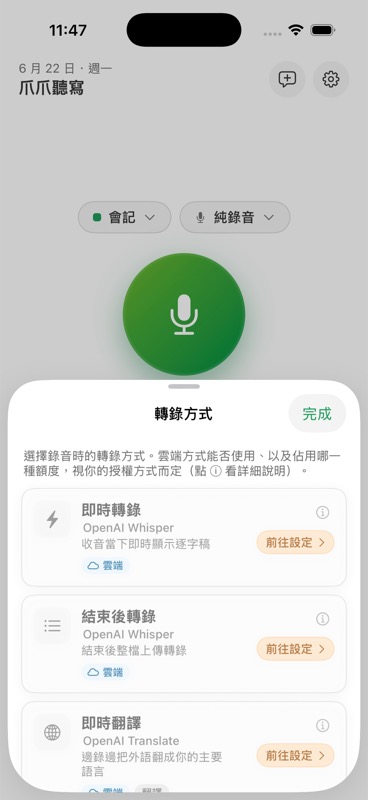
立即、背景、裝置端、即時、翻譯與純錄音各自標示需求;背景模式依帳號開通狀態顯示。Immediate, background, on-device, live, translation and audio-only choices clearly show their requirements.
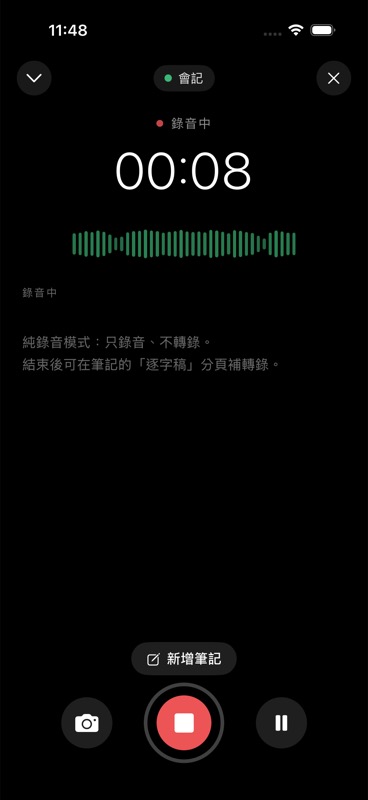
錄音中保留計時、波形、個人筆記、拍照、暫停與停止,長錄音時也能保持節奏。Timer, waveform, notes, camera, pause and stop controls stay available during recording.
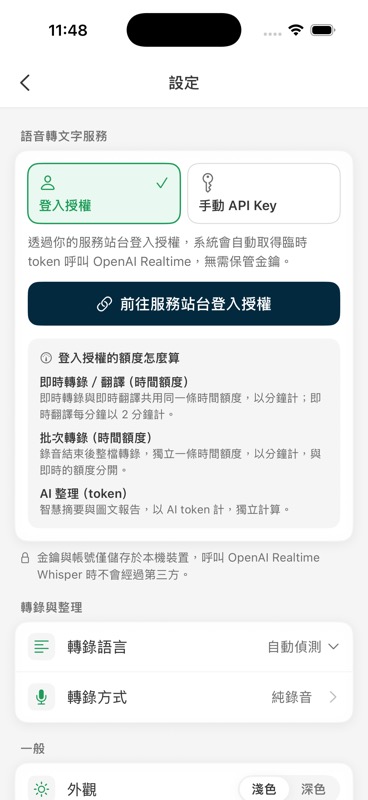
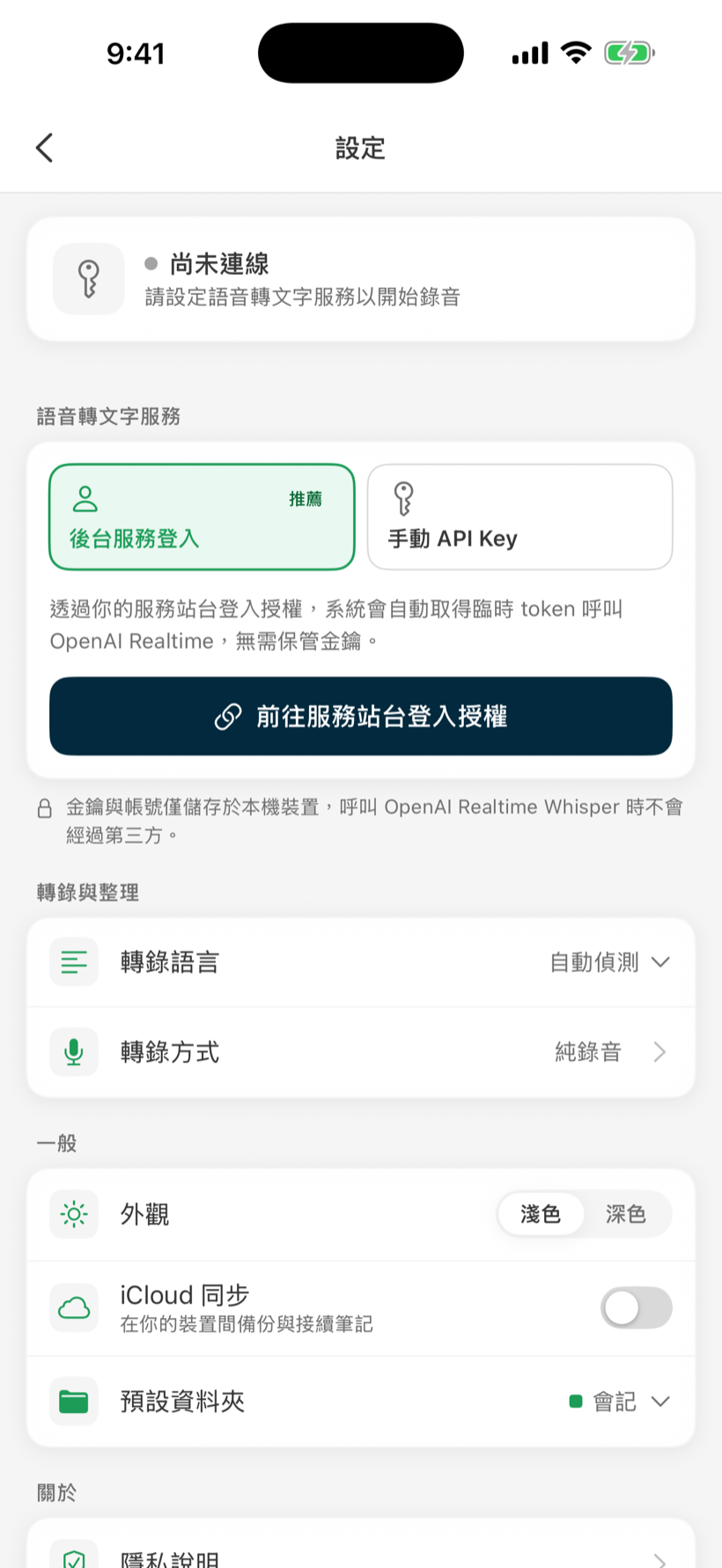
後台登入、手動 API Key、即時/批次/AI 額度與轉錄偏好集中在設定頁管理。Backend sign-in, manual API keys, usage buckets and transcription preferences live in Settings.
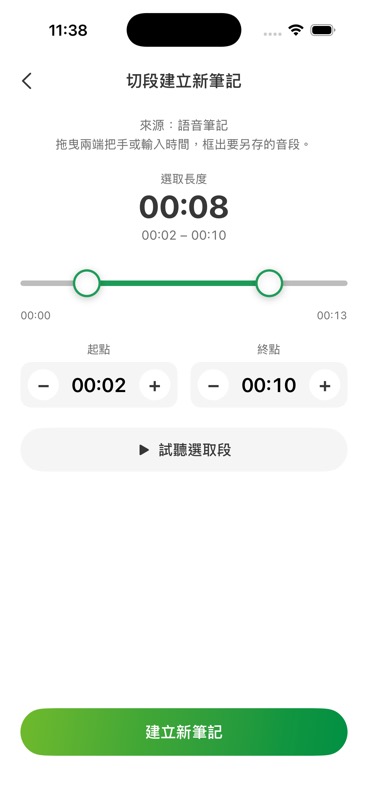
在來源錄音上拖曳把手或輸入 mm:ss 選一段音,可先試聽,一鍵裁成獨立新筆記,原筆記不受影響。Drag the handles or type mm:ss on the source recording, preview the selection, then cut it into a brand-new note — the original stays untouched.
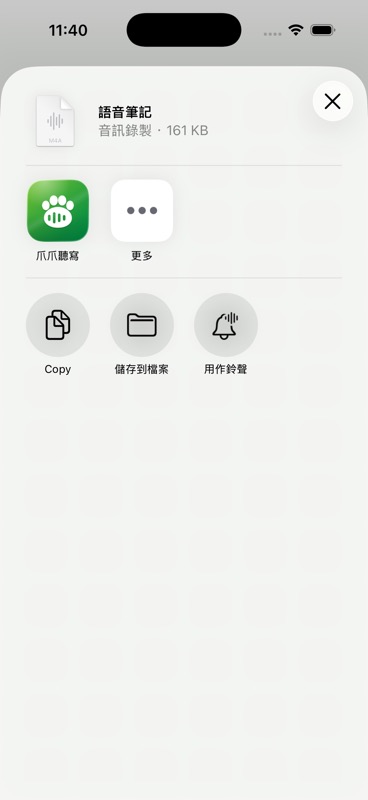
在「檔案」、通訊或雲端硬碟 App 用系統分享選單選「爪爪聽寫」,音檔自動匯入成新筆記。Pick “Paw Dictation” from the system share sheet in Files or any messaging and cloud-drive app — the audio becomes a new note automatically.
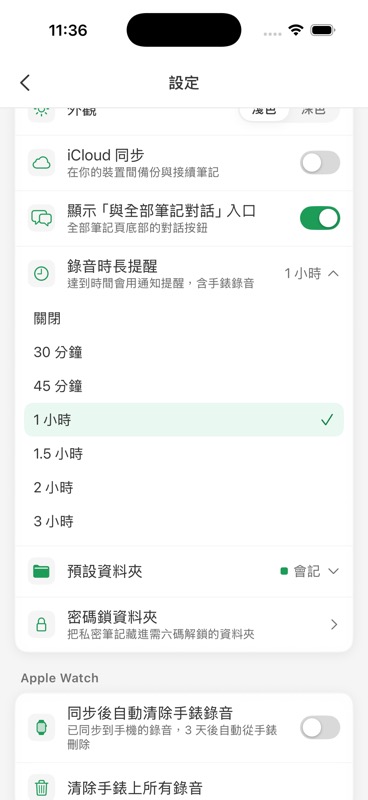
設定要提醒的時間門檻,從 30 分鐘到 3 小時,達標跳本機通知;暫停不計時,手錶錄音也適用。Pick a threshold from 30 minutes to 3 hours — a local notification fires when you hit it. Paused time doesn't count, and it applies to watch recordings too.
轉錄、摘要、逐字稿、圖文報告、搜尋、對話追問——所有你需要的整理,都在錄完後自動成形。Transcription, summaries, timeline, rich reports, search and chat — everything takes shape right after you stop.
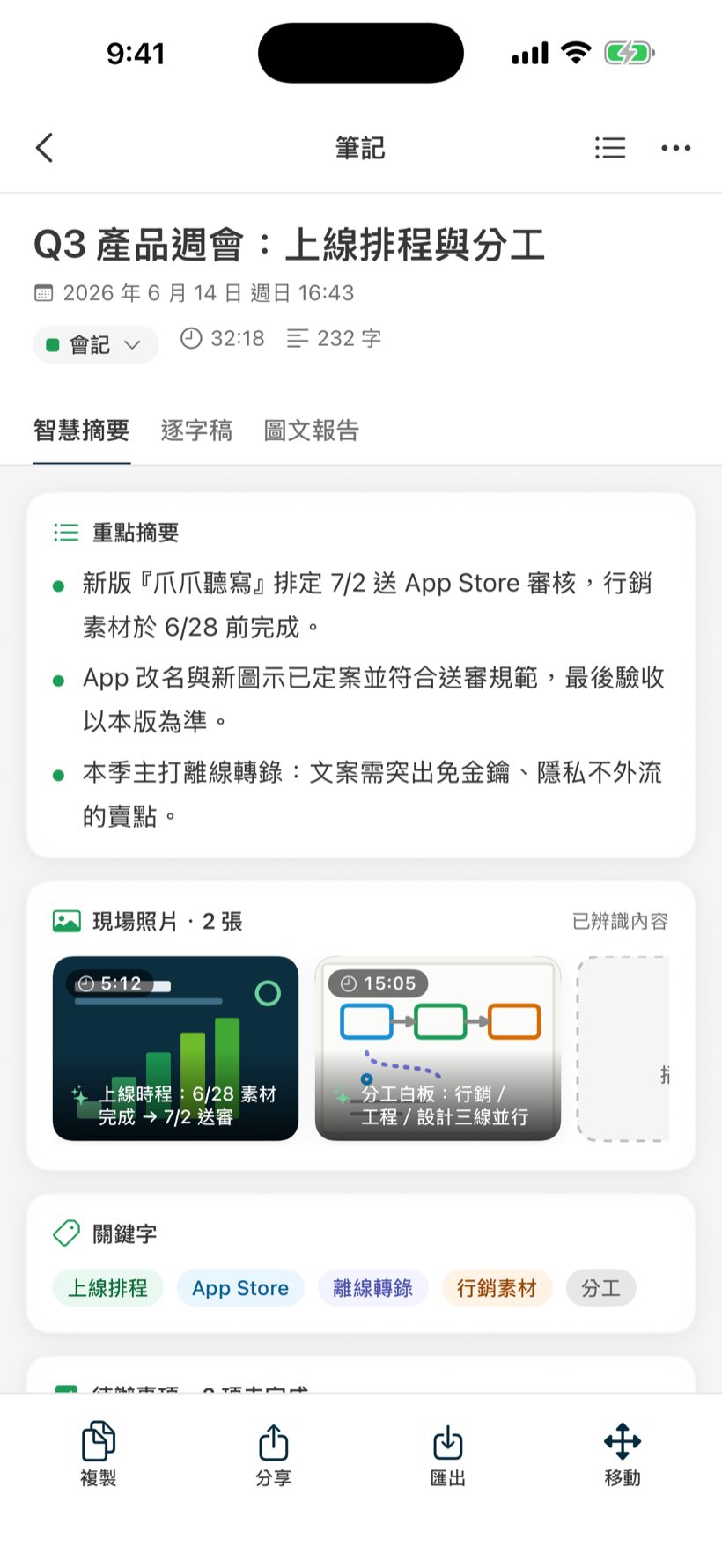
錄完自動生成「重點摘要、關鍵字、待辦事項」,還能整理錄音中拍下的現場照片並標上時間點。智慧摘要、逐字稿、圖文報告分頁切換,會議結論一眼掌握。After recording you get key points, keywords and to‑dos automatically — plus on‑site photos pinned to their timestamps. Switch between Summary, Transcript and Rich report tabs.
逐字稿依時間軸排列、自動分段;點任一段時間即可跳播回放,回看不費力。逐字稿也納入全文搜尋。The transcript is laid out on a timeline and segmented for reading. Tap a timestamp to jump playback — and every word is searchable.
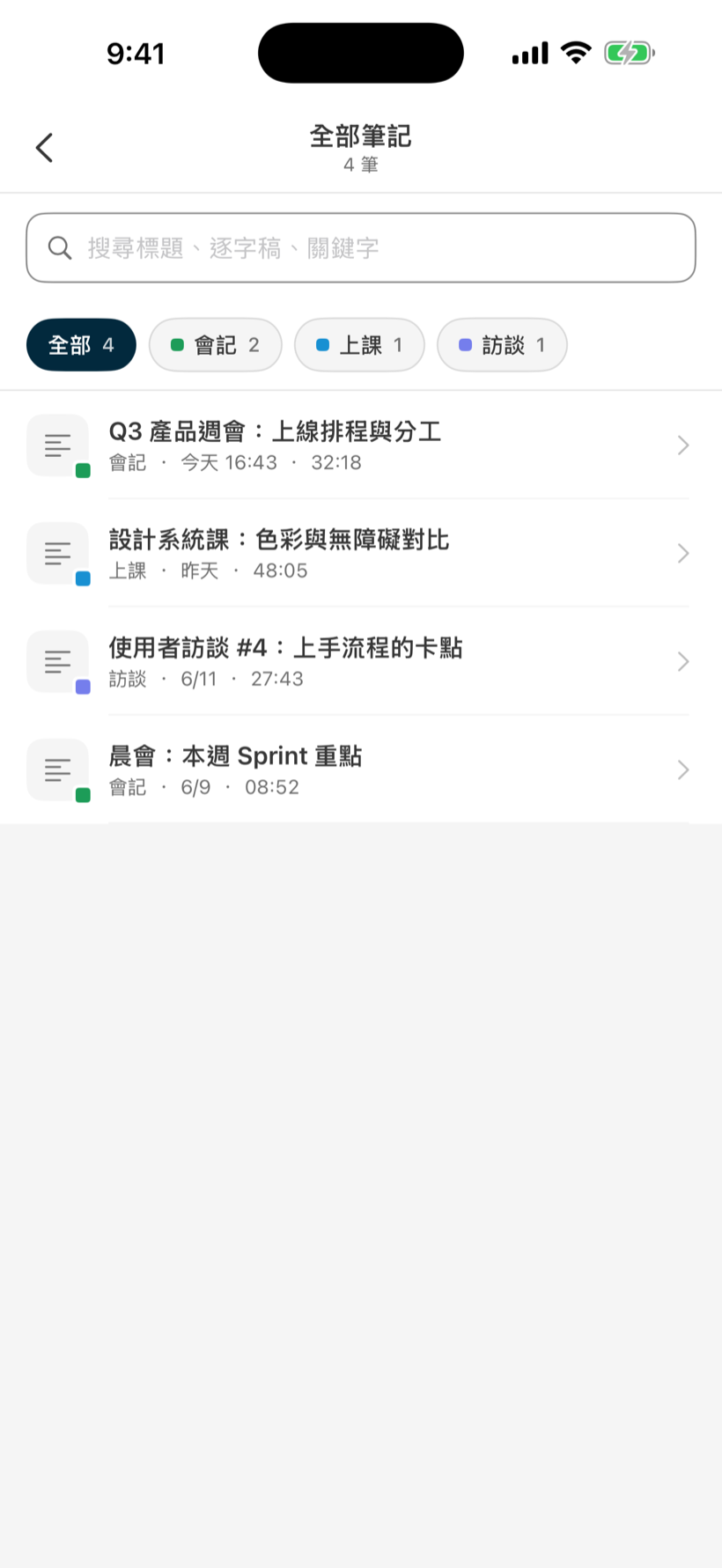
全部錄音與逐字稿集中管理,依資料夾(會議/上課/訪談)篩選;標題、逐字稿、關鍵字全文搜尋,再多筆記也找得到。All recordings and transcripts in one place, filtered by folder (meetings / lectures / interviews). Search titles, transcripts and keywords across everything.
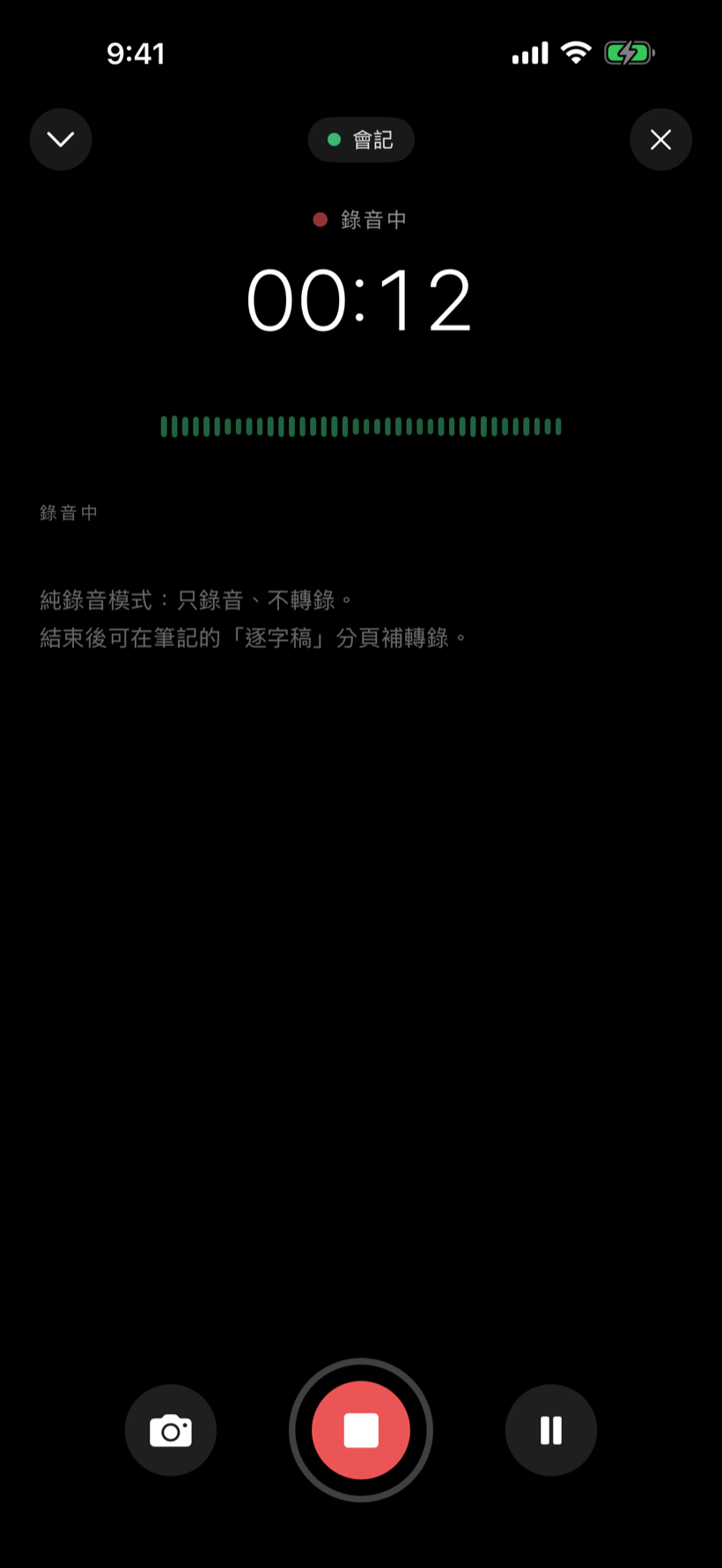
深色沉浸介面、波形動畫與計時讓你專注當下;錄音中可暫停、停止,並即時插入現場照片——投影片、白板、文件隨手拍下。A dark, immersive screen with an animated waveform and timer. Pause or stop anytime, and snap on‑site photos — slides, whiteboards, documents — without leaving the recorder.
針對單篇筆記,或一次橫跨整個筆記庫提問;AI 以你的筆記為依據回答、逐字串流顯示,並在句末標上來源引用。點來源即可跳回那則筆記,逐字稿來源還會跳到對應時間點。Ask a single note, or your whole library at once. Answers stream in word by word, grounded in your notes and tagged with source citations. Tap a source to jump back to that note — transcript sources even jump to the exact moment.
智慧校稿、校對記憶、尋找取代、帳號額度與私密資料夾,讓整理與管理都更完整。下方以淺色介面示意。Smart proofreading, correction memory, find and replace, usage details and locked folders round out the workflow. Shown below in the light interface.
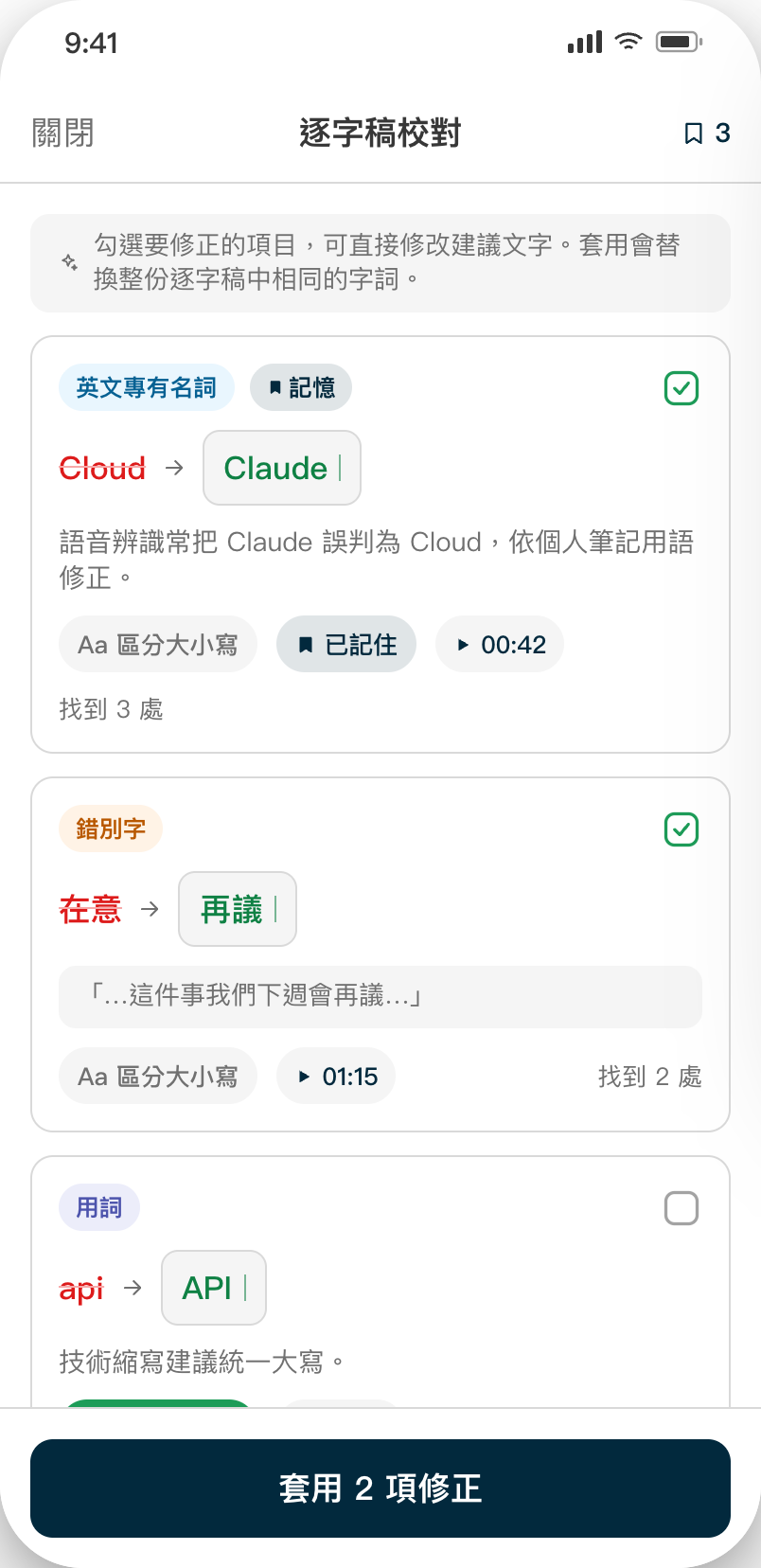
AI 自動挑出錯別字與英文專有名詞辨識錯誤,逐項勾選、可改建議文字,一鍵替換整份逐字稿。AI flags typos and misheard proper nouns. Review each one, tweak the suggestion, and apply across the whole transcript in one tap.
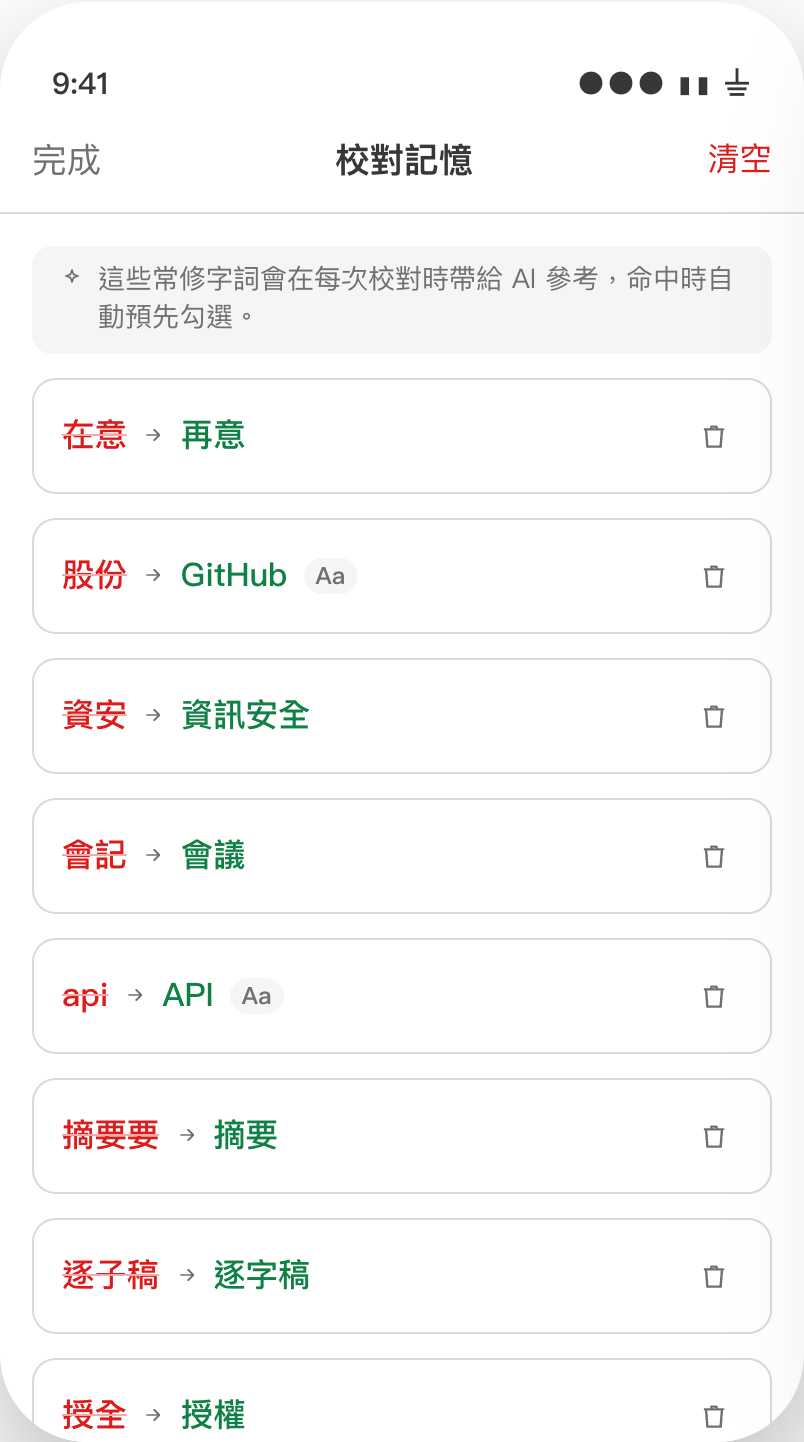
在更正項目按「記住」,把「錯→對」對照存起來;下次校對自動帶給 AI 參考,命中時預先勾選。產生逐字稿的當下也會自動套用,不用等你手動校對。Tap “remember” on a fix to store the wrong→right pair. Next time it’s fed to the AI and pre-checked automatically — and now applied the moment a transcript is generated, before you even open proofread.
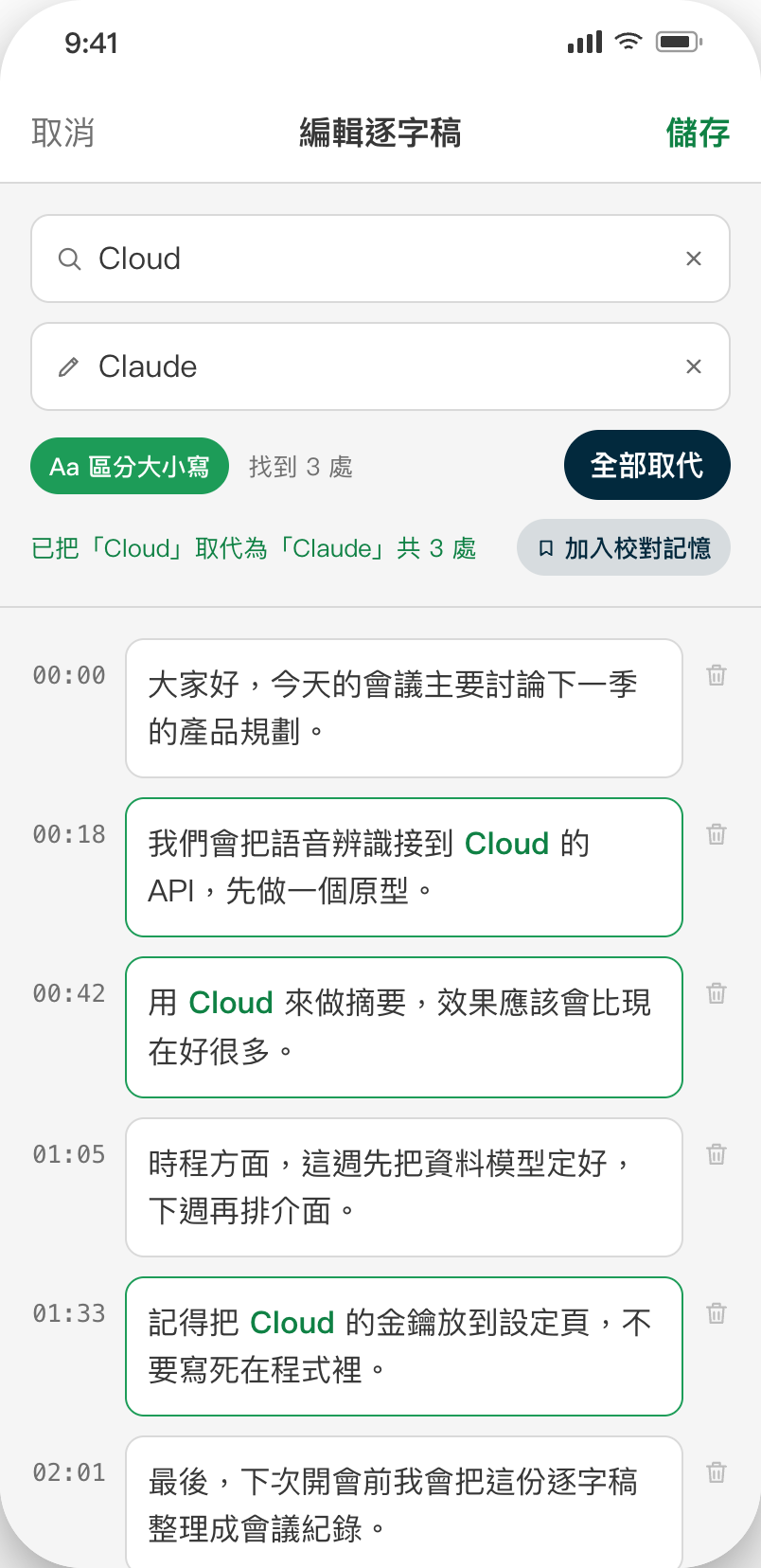
逐句修改逐字稿,內建尋找/取代與「全部取代」,命中字詞即時高亮,還能直接加入校對記憶。Edit segment by segment with built-in find & replace, live match highlighting, and save terms straight to proofing memory.
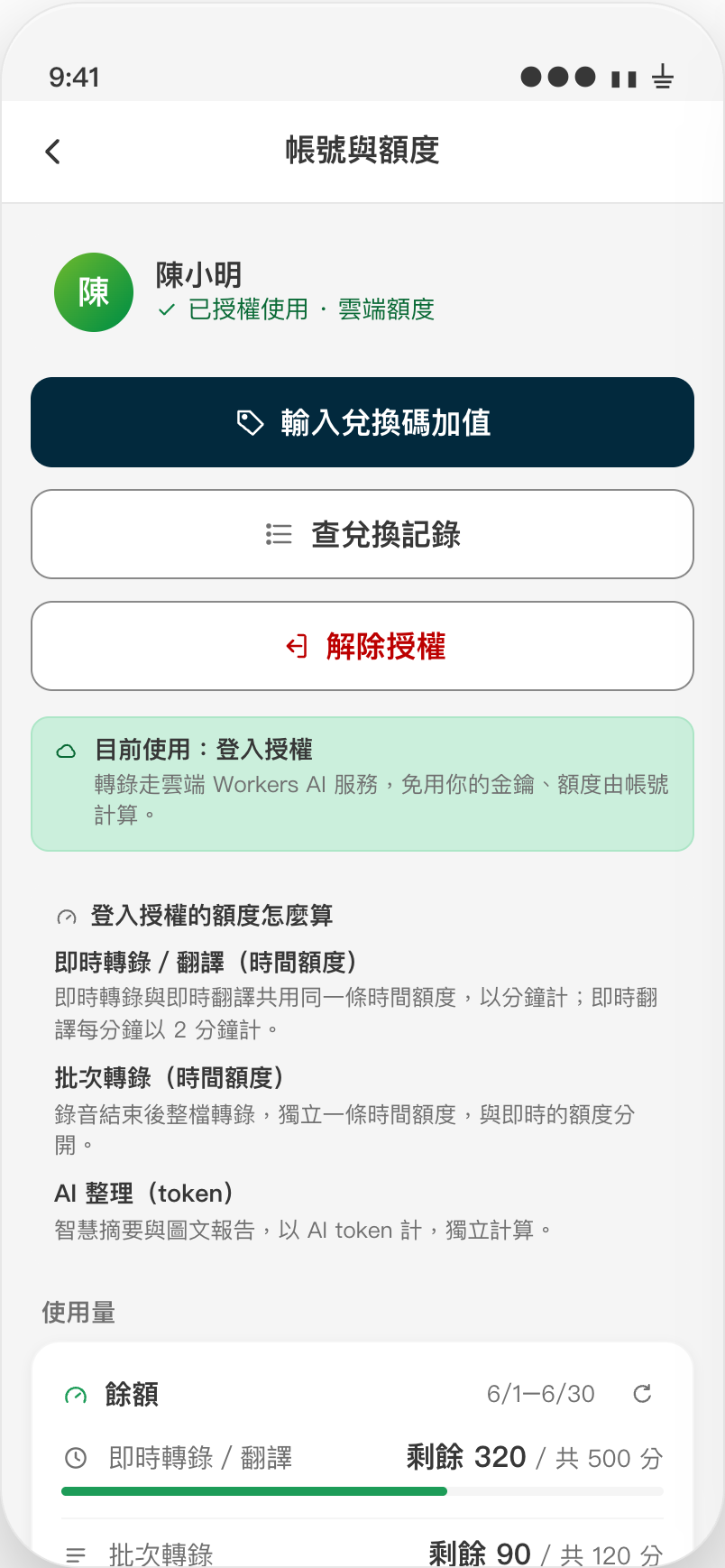
設定主頁收合成摘要列,連線方式與完整用量搬進獨立詳情頁;即時/批次/AI 三條額度與餘額一目了然。Settings collapses to a summary row; connection and full usage move to a dedicated page showing live/batch/AI quotas at a glance.
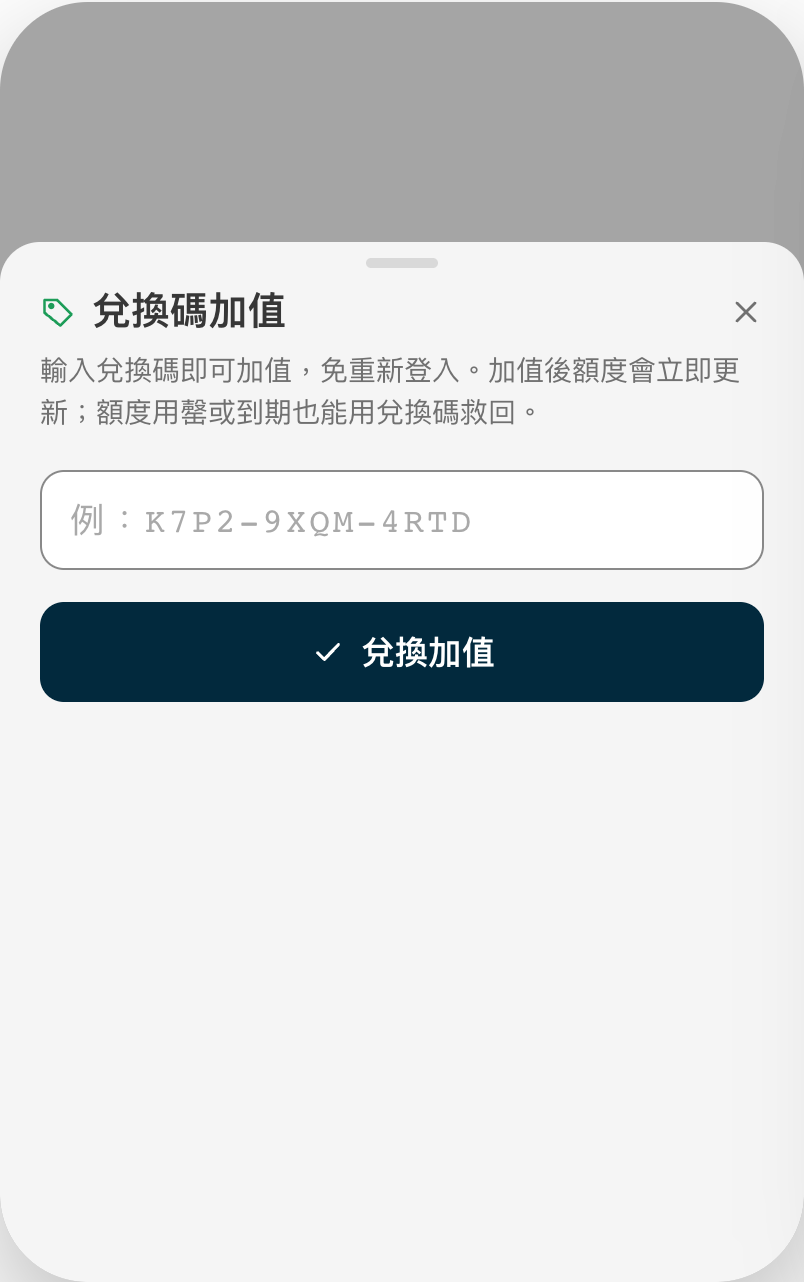
輸入兌換碼即可加值,免重新登入;額度立即更新,用罄或到期也能用兌換碼救回。Enter a code to top up without signing in again — quotas update instantly, even after they run out or expire.
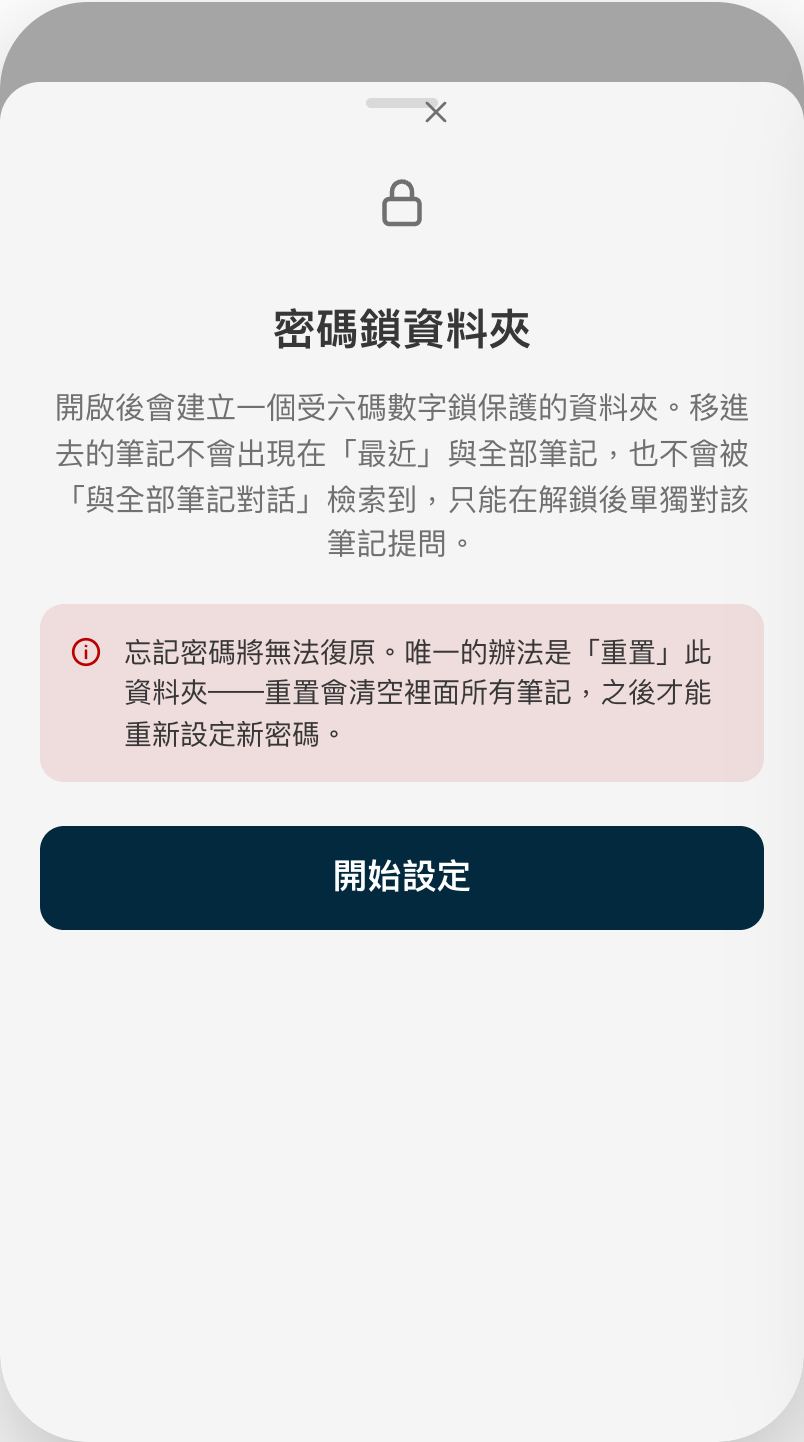
六碼數字鎖保護的資料夾,移進去的筆記不出現在最近與全部筆記,也不會被「與全部筆記對話」檢索到。A six-digit PIN folder. Notes inside stay out of Recent, All notes, and the “chat with all notes” search.
除了錄音與摘要,最新版本也把大量轉錄、語音互動與回查逐字稿補成完整流程。Beyond recording and summaries, the latest version adds a complete workflow for bulk transcription, voice interaction and transcript review.
一次選取多則純錄音筆記送出;處理名額、等待中與上傳進度看得見。音檔上傳完成即可關 App,稍後自動取回。Select multiple audio notes at once, see active slots and queued uploads, then close the app after upload and retrieve results later.
在雲端對話模式直接開口追問;支援麥克風靜音、字幕、自動結束倒數,也能用口頭說「結束」掛斷。Ask follow-ups aloud in cloud chat, with mute, live captions, an end countdown and spoken hang-up commands.
關鍵字命中直接標黃,可用上一則/下一則快速巡覽,找到後點時間就跳回原始音檔位置。Matches are highlighted, with previous/next navigation and one-tap seeking back to the exact audio moment.
完成轉錄後會參考會議資訊、個人筆記與逐字稿產生標題;校對記憶可在新逐字稿產生時自動套用。Titles can use meeting info, personal notes and the transcript; saved proofreading memory can be applied as new transcripts arrive.
要當場看字、錄完立即處理、上傳後離手、完全離線,或只錄音?每一段都能選最適合的方式。See words live, wait for immediate processing, upload and walk away, stay fully offline, or just record — choose per session.
音訊串流直送 OpenAI,收音當下即顯示逐字稿;服務端不替 App 暫存完整音檔。Audio streams directly to OpenAI and text appears live; the app service does not stage a full audio file.
錄音結束後上傳整檔或切段處理;轉錄期間 App 要開著等,完成後當場取得逐字稿。Upload the file or chunks after recording and keep the app open until the transcript returns.
音檔切段經 HTTPS 上傳至私有暫存,完成上傳即可離手;逐字稿結果採裝置持鑰加密,下次開 App 自動取回。Audio chunks upload over HTTPS to private temporary storage. Once upload finishes, leave the app; transcript results are encrypted to a device-held key.
邊錄邊在 iPhone 上出字;轉錄音訊與逐字稿不送雲端,首次使用該語言才需下載模型。Text appears live on iPhone; transcription audio and text stay local, after the one-time language-model download.
錄完後在 iPhone 上整檔處理;免費、無上傳大小限制,轉錄音訊不離開裝置。Process the full file on iPhone after recording — free, no upload-size limit, and no transcription audio leaves the device.
先單純錄起來,轉錄流程不連雲端;事後再決定是否補轉逐字稿。Just capture audio with no transcription cloud connection; decide later whether to transcribe.
音訊即時串流直送 OpenAI,邊錄邊翻成主要語言;只保留翻譯後文字,不暫存完整音檔。Audio streams directly to OpenAI for live translation; only translated text is kept, without staging a full audio file.
「本機」「即時雲端」「背景雲端」不是同一件事。下面把音訊送到哪裡、會不會暫存,以及金鑰放在哪裡分開說清楚。On-device, live cloud and background cloud are distinct paths. Here is exactly where audio goes, whether it is staged, and where credentials live.
最重視隱私、離線與免費For maximum privacy, offline use and zero transcription cost
邊說邊出字,不先上傳完整檔案Words appear live without first uploading a complete file
錄完上傳,App 開著等結果Upload after recording and keep the app open
唯一會為離手處理而暫存音檔的轉錄模式The only transcription mode that stages audio for unattended processing
突然的靈感、臨時開始的會議——不用掏出手機,抬腕點一下就開始錄;之後自動同步回 iPhone 做轉錄與摘要。A sudden idea, a meeting that just kicked off — no need to dig out your phone. Tap once on your wrist to record, then it syncs back to iPhone for transcription and summaries.
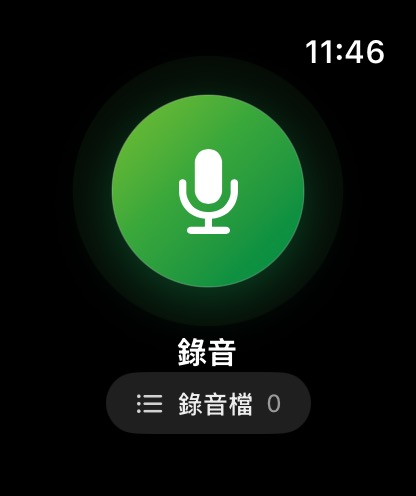
手錶 App 可獨立運作:開啟即錄、手錶端直接播放回放。錄音檔會在連線時自動回傳 iPhone,建立純錄音筆記,日後再補上轉錄與 AI 重點。The watch app works on its own: open and record, then play back right on your wrist. Recordings transfer to iPhone when connected and become audio notes you can transcribe and summarize later.
打開手錶 App 就是一顆大錄音鍵,抬腕一點立刻開始。The watch app opens straight to one big record button.
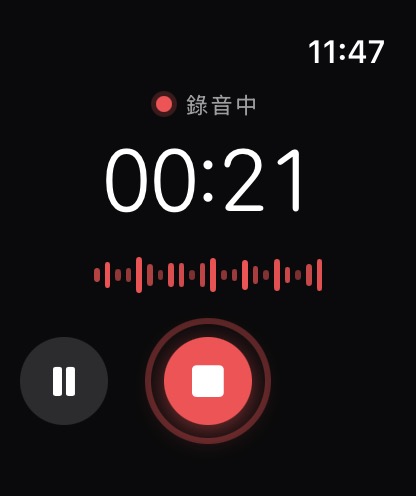
即時波形與計時;按 Digital Crown 回錶面也持續錄。Live waveform and timer; keeps going in the background.
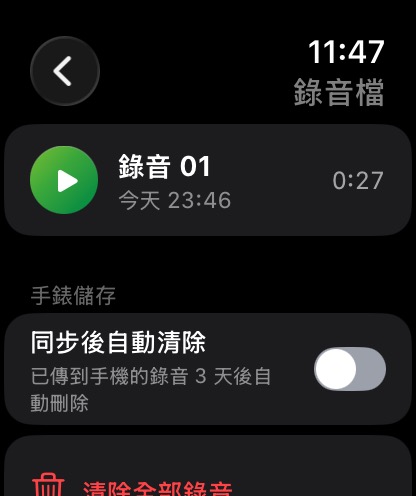
停止錄音就存進手錶本機列表,同步到 iPhone 後可設定自動清除。Stops land in a local list on the watch; set it to auto‑clear once synced to iPhone.
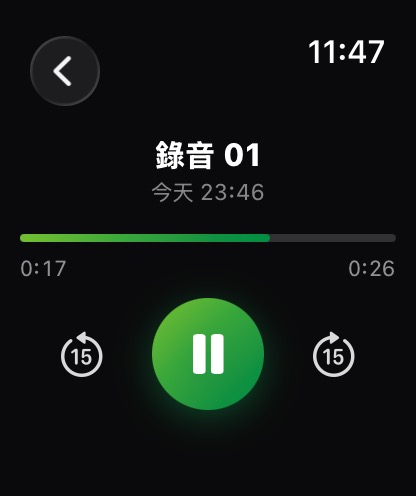
不必等同步,直接在手錶上重聽剛剛錄的內容。Replay what you just recorded right on your wrist.
手動 API Key 加密存在裝置 Keychain,由 App 直連 OpenAI;登入授權則由後端核發短效憑證,真正的服務金鑰只留在後端。要完全不外傳,請選裝置端轉錄/對話並關閉 iCloud 同步。 Your own API key is encrypted in the device Keychain and used for direct OpenAI connections. Backend sign-in issues short-lived credentials while the service key stays server-side. For an all-local setup, use on-device transcription and chat with iCloud disabled.
爪爪聽寫即將上架 App Store。一鍵開錄,重點自動成形。Paw Dictation is coming soon to the App Store. Tap once — the key points take shape on their own.